The Charter Booking Software That Works While You Sleep
Stop losing bookings to slow quote emails. GridOps gives charter operators instant online booking, automated pricing, and real-time dispatch, all in one platform.




Easy to use
Not a computer person? You’re in the right place.
We built GridOps for people who run buses, not for people who build software. If you can send an email, you can use GridOps. And you will never be left figuring it out on your own.
Meet Nash, your helper inside GridOps
Stuck? Just ask Nash.
No manuals. No waiting on hold. Type your question in plain words, the way you’d ask a friend. Nash takes you straight to the right page and lights up the exact button to click.
Knows which screen you’re on
Takes you straight to the page you need
Lights up the exact button to click
There any time, day or night
Ask Nash anything…
Nash
Here to help
I’ve never done this before. How do I add a bus?
No problem, I’ll walk you through it.
1. Tap Vehicles on the left.
2. Tap Add Vehicle.
3. Fill in the details and save.
Take me there
Where is Add Vehicle?
Right here. I’ve lit it up for you.
Add Vehicle
Plain English
Knows your screen
Deposit amount
The part of the price your customer pays up front to hold their booking.
Cancellation policy
A help icon on everything
See a question mark next to a setting, a tool, or a button? Tap it. It tells you, in plain words, what it is and what it does.
Adding vehicles to your fleet
Setting up the quote widget
Setting up tax rates
120+ simple guides
Short, step-by-step guides for everything, from adding your first bus to sending your first quote. Open them any time, day or night.


Real people, happy to help
A real person when you want one
Book a call and we’ll show you around. Or choose guided onboarding, and we’ll set everything up with you and train your team.
Take it one step at a time. Help is always one tap away.
Easy to use
Not a computer person? You’re in the right place.
We built GridOps for people who run buses, not for people who build software. If you can send an email, you can use GridOps. And you will never be left figuring it out on your own.
Meet Nash, your helper inside GridOps
Stuck? Just ask Nash.
No manuals. No waiting on hold. Type your question in plain words, the way you’d ask a friend. Nash takes you straight to the right page and lights up the exact button to click.
Knows which screen you’re on
Takes you straight to the page you need
Lights up the exact button to click
There any time, day or night
Ask Nash anything…
Nash
Here to help
I’ve never done this before. How do I add a bus?
No problem, I’ll walk you through it.
1. Tap Vehicles on the left.
2. Tap Add Vehicle.
3. Fill in the details and save.
Take me there
Where is Add Vehicle?
Right here. I’ve lit it up for you.
Add Vehicle
Deposit amount
The part of the price your customer pays up front to hold their booking.
Cancellation policy
A help icon on everything
See a question mark next to a setting, a tool, or a button? Tap it. It tells you, in plain words, what it is and what it does.
Adding vehicles to your fleet
Setting up the quote widget
Setting up tax rates
120+ simple guides
Short, step-by-step guides for everything, from adding your first bus to sending your first quote. Open them any time, day or night.
Real people, happy to help
A real person when you want one
Book a call and we’ll show you around. Or choose guided onboarding, and we’ll set everything up with you and train your team.
Take it one step at a time. Help is always one tap away.
Easy to use
Not a computer person? You’re in the right place.
We built GridOps for people who run buses, not for people who build software. If you can send an email, you can use GridOps. And you will never be left figuring it out on your own.
Meet Nash, your helper inside GridOps
Stuck? Just ask Nash.
No manuals. No waiting on hold. Type your question in plain words, the way you’d ask a friend. Nash takes you straight to the right page and lights up the exact button to click.
Knows which screen you’re on
Takes you straight to the page you need
Lights up the exact button to click
There any time, day or night
Ask Nash anything…
Nash
Here to help
I’ve never done this before. How do I add a bus?
No problem, I’ll walk you through it.
1. Tap Vehicles on the left.
2. Tap Add Vehicle.
3. Fill in the details and save.
Take me there
Where is Add Vehicle?
Right here. I’ve lit it up for you.
Add Vehicle
Deposit amount
The part of the price your customer pays up front to hold their booking.
Cancellation policy
A help icon on everything
See a question mark next to a setting, a tool, or a button? Tap it. It tells you, in plain words, what it is and what it does.
Adding vehicles to your fleet
Setting up the quote widget
Setting up tax rates
120+ simple guides
Short, step-by-step guides for everything, from adding your first bus to sending your first quote. Open them any time, day or night.
Real people, happy to help
A real person when you want one
Book a call and we’ll show you around. Or choose guided onboarding, and we’ll set everything up with you and train your team.
Take it one step at a time. Help is always one tap away.
Pricing
Transparent Pricing
Transparent Pricing
Transparent Pricing
Founding operator pricing is open
$40
per bus per month. Everything included.
Founding operators pay $20 per bus, locked for 3 years. First 10 operators only.
✓
Never pay a % of your charter bookings
✓
Every feature included, no gated features
✓
No per-user fees or long-term contracts
✓
30-day free trial
✓
Payments go straight to your own Stripe
Founding operator pricing is open
$40
per bus per month. Everything included.
Founding operators pay $20 per bus, locked for 3 years. First 10 operators only.
✓
Never pay a % of your charter bookings
✓
Every feature included, no gated features
✓
No per-user fees or long-term contracts
✓
30-day free trial
✓
Payments go straight to your own Stripe
Founding operator pricing is open
$40
per bus per month. Everything included.
Founding operators pay $20 per bus, locked for 3 years. First 10 operators only.
✓
Never pay a % of your charter bookings
✓
Every feature included, no gated features
✓
No per-user fees or long-term contracts
✓
30-day free trial
✓
Payments go straight to your own Stripe

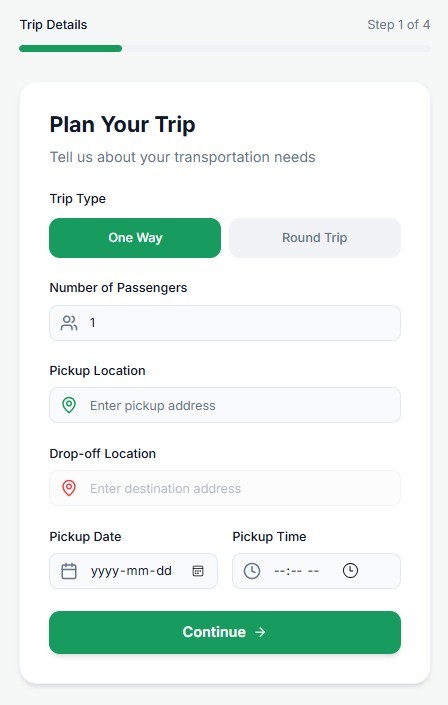
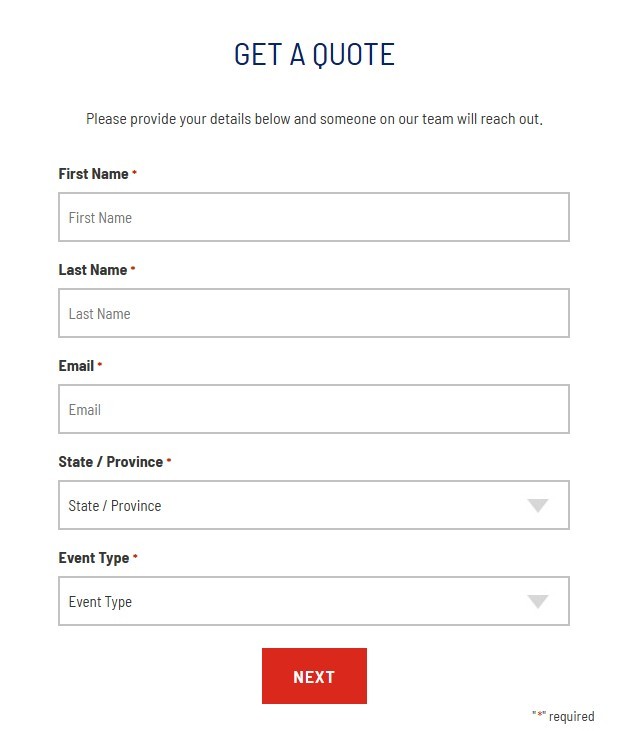
Kill the “Request a Quote” Button.
Stop forcing customers to wait 24 hours for a PDF.
Give them real-time pricing and instant booking on your website today.
Kill the “Request a Quote” Button.
Stop forcing customers to wait 24 hours for a PDF. Give them real-time pricing and instant booking on your website today.
Kill the “Request a Quote” Button.
Stop forcing customers to wait 24 hours for a PDF.
Give them real-time pricing and instant booking on your website today.